
Introduction: Why Getting Projection Right Matters in Gallery Contexts
Projection is one of the most powerful tools in contemporary exhibition design. A well-executed projection installation can transform a space, create immersive experiences, and engage audiences in ways that static displays cannot. However, poor specification (wrong brightness levels, unsuitable surfaces, inadequate content management) can undermine even the strongest curatorial vision.
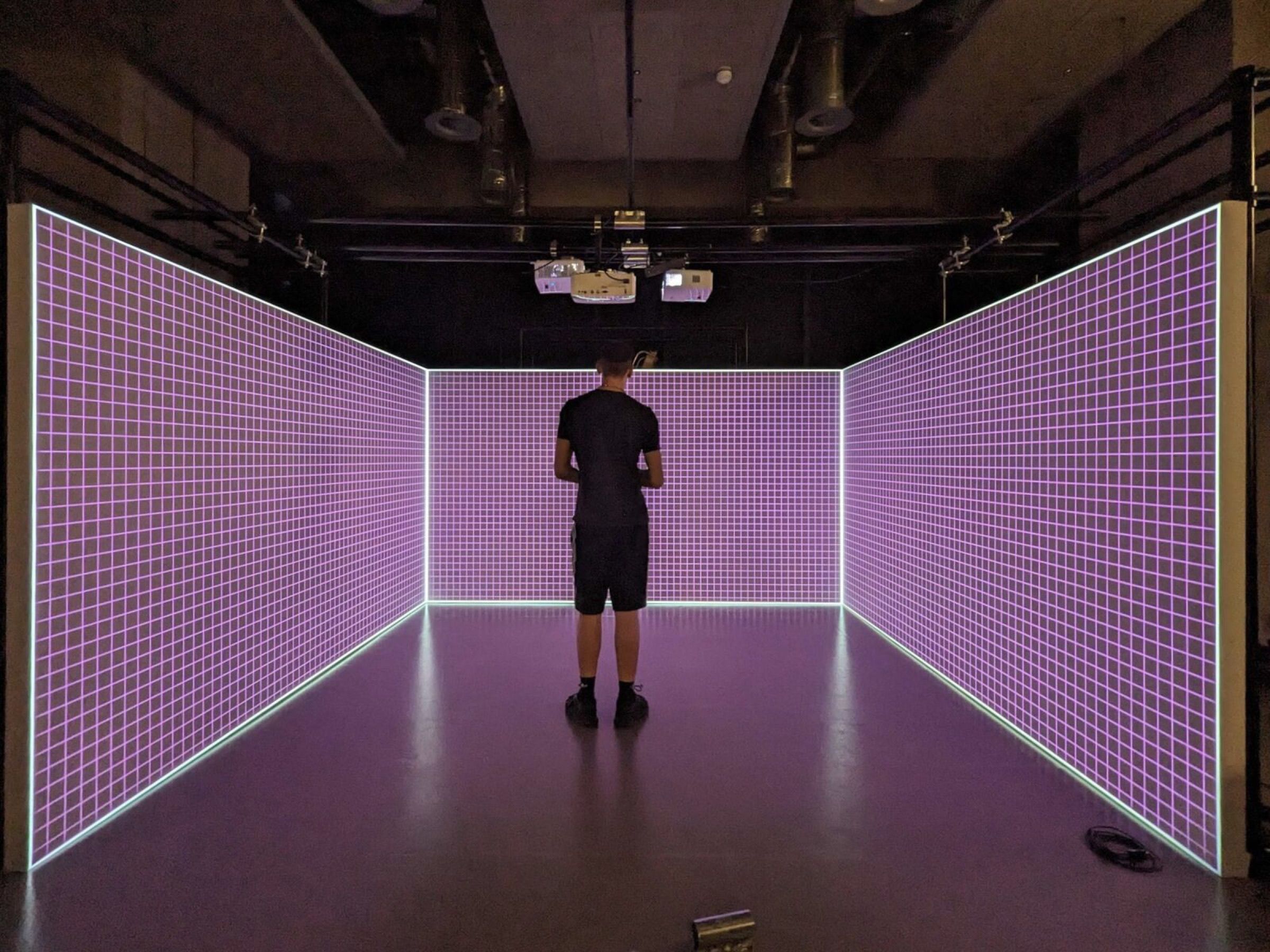
This guide is written for curators, exhibition designers, and cultural leaders who are planning projection-based work but may not have deep technical expertise. By understanding the fundamentals, you'll be better equipped to brief production partners, ask the right questions, and make informed decisions that align with your artistic and budgetary goals.
Start With the Space
Before you select a projector or surface, you need to understand the physical and environmental conditions of your exhibition space. This foundational analysis will inform every subsequent decision.
Ambient Light
Gallery lighting is one of the most important factors affecting projection quality. Ambient light, whether from windows, ceiling fixtures, or spotlights on adjacent artworks, will reduce the contrast and visibility of your projected content. Museums and galleries typically aim for low ambient light (200–300 lux) to protect artworks and create focused viewing conditions. Take advantage of this: low light means you can use less powerful (and more affordable) projectors.
If your space has skylights or windows, consider the time of day your exhibition will be viewed. Morning light will behave differently than afternoon light. If the projection area faces a window, you may need to invest in blackout solutions or choose a brighter projector than you'd otherwise need.
Wall Colour and Surface Finish
The colour and finish of your projection surface matter more than many assume. A bright white wall will produce a brighter image but may feel harsh; a slightly off-white or warm grey can soften the look while reducing brightness by only 10–15%. Matte finishes are preferable to glossy ones in most gallery contexts, as they prevent hot spots and reduce glare from reflected ambient light.
If you're projecting onto a painted wall, choose a paint finish specifically designed for projection (typically matte or eggshell), not high-gloss. Test your paint selection with sample projections if possible. What looks right in a paint chip may look different in your actual space under projection.
Throw Distance and Ceiling Height
Throw distance is the distance from the projector lens to the projection surface. It directly affects image size and the choice of projector lens. In gallery spaces, throw distance is often constrained by ceiling height and spatial layout.
If your ceiling is low (under 3.5 metres) or you have limited depth, you'll need a short-throw or ultra-short-throw projector, which can fill a large wall from a shorter distance. Standard throw projectors require more distance and work better in deeper gallery spaces. Ultra-short-throw projectors are increasingly sophisticated and can produce gallery-quality images, but they typically cost more.
Work with your production partner to calculate the required throw distance for your desired image size. This calculation is essential for budget planning and logistics.
Viewer Proximity
How close will audiences stand to the projection surface? If viewers are expected to stand within 1–2 metres of the image, you'll need to consider higher resolution so individual pixels aren't visible, lower brightness to avoid glare and eye fatigue at close range, and a pixel pitch appropriate to that viewing distance.
Conversely, if viewers will stand 5+ metres away, a standard brightness projector may suffice for clear, engaging visuals.
Choosing the Right Projector
Once you understand your space, you can begin selecting a projector. There are several key specifications to evaluate.
Brightness (Lumens)
Brightness is measured in lumens. Higher brightness is not always better; it depends on ambient light, throw distance, and image size. As a rough guide for gallery spaces, 2,500–4,000 lumens suits a dim, light-controlled room; 4,000–7,000 lumens suits moderate ambient light; and 7,000 lumens or more is needed wherever daylight or bright gallery lighting can't be avoided.
Oversizing brightness wastes money and energy. Work backwards: calculate your desired image size and brightness, then select a projector that meets that spec without significant excess.
Resolution
Standard projector resolutions are 1920×1200 (WUXGA) or 4K (3840×2160). For most gallery applications viewed from a distance, WUXGA resolution is sufficient and significantly cheaper than 4K. 4K is justified if viewers stand close to a large image, if the content is highly detailed — fine line work, text, or photographic material — or if the projection surface is especially large.
For most gallery projection, the content creation and curation matter more than native 4K resolution.
Lens Options and Flexibility
Professional projectors often allow lens changes. A fixed-lens projector is more affordable upfront but less flexible if your space or image size changes. Interchangeable lenses allow you to adapt a single projector to different throw distances, which can be valuable if you plan to reuse equipment across multiple exhibitions.
Short Throw vs. Long Throw vs. Ultra-Short-Throw
Standard (long throw): Traditional design; requires significant distance (typically 2–3× image width). Most affordable option for standard throw distances.
Short throw: Specialised lens design allowing projection from closer distances (typically 1–2× image width). More expensive but valuable in constrained spaces.
Ultra-short-throw (UST): Extreme lens design for very close distances (0.3–1× image width). Premium pricing but essential for low-ceiling galleries or installations where throw distance is severely limited.
Choose based on your space constraints and budget. Don't overpay for ultra-short-throw if a standard throw projector fits your space.
Noise Levels
Gallery environments demand quiet operation. A loud projector fan is disruptive and degrading to the viewing experience. Check the projector's noise specification (measured in decibels). For gallery use, aim for under 30 dB in quiet, contemplative spaces, and under 35 dB where there is some ambient sound or the projector can be housed away from visitors.
Professional gallery projectors typically prioritize quiet operation; budget consumer projectors often do not.
Surface Matters: Projection Screens vs. Painted Walls vs. Alternatives
The surface onto which you project significantly affects image quality and aesthetic.
Painted Walls
Many galleries project directly onto painted walls. Advantages: it's low-cost, needs no additional hardware, keeps the architecture clean, and suits temporary shows where a screen would intrude.
Disadvantages: walls are rarely perfectly flat or uniformly coloured, they absorb more light than a dedicated screen (reducing brightness and contrast), and surface texture can soften a crisp image. If you do project onto a wall, use a proper projection paint — matte finish, neutral colour, high reflectance — and avoid standard emulsion.
Projection Screens
Professional projection screens offer better brightness, uniformity, and image quality than painted walls. Advantages: a controlled, purpose-built surface, consistent colour and gain, and maximised contrast.
Disadvantages: screens add cost, need a frame or rigging, and introduce a visible technical element into the space. They're justified when image quality is paramount, throw distances are fixed, or the exhibition design welcomes visible technical elements.
Rear Projection
Rear projection (projecting from behind a translucent screen) creates a clean front-of-house appearance with no visible projector. It's elegant but requires depth behind the screen, often not feasible in confined gallery spaces. Consider rear projection only if you have adequate space and the budget to match.
Sharkstooth Gauze and Layered Effects
Sharkstooth gauze is a semi-transparent material that allows front and rear projections to coexist, creating layered visual effects. Audiences see front-projected content while rear projection illuminates the gauze itself. This technique is powerful for immersive installations but requires careful specification, dual projectors, and precise synchronisation. Work with a specialist if considering this approach.
Content and Playback
Specification extends to the systems that deliver and manage your content.
Media Players
Professional gallery installations typically use dedicated media players or servers rather than laptops. Options include solid-state players such as BrightSign for reliable single-channel looping, media servers like Dataton WATCHOUT or Modulo Pi for complex multi-screen and mapped work, and a purpose-configured mini-PC for simpler cases.
Match the sophistication of your media system to the complexity of your content.
Looping and Continuous Playback
Most gallery installations run continuously during opening hours. Your media system must be reliable, handle long-duration playback, and manage power cycles (overnight shutdown). Plan for automatic daily start-up and shutdown, seamless looping with no visible black frame or restart, and watchdog recovery that resumes playback automatically after a power interruption.
Multi-Channel Synchronisation
If your installation involves multiple projectors displaying different content (or the same content across multiple screens), synchronisation is critical. Lag or drift between channels is immediately visible and breaks the immersive effect. Specification should include frame-accurate synchronisation (genlock or an equivalent), media players or a server built for multi-channel output, and a full end-to-end test of the synced system before install day.
Content Formats and Delivery
Specify the formats you'll use (e.g., ProRes, H.264) and delivery method (local storage, cloud, network streaming). Different projectors and media servers support different formats; mismatches create last-minute headaches. Confirm format compatibility during specification, not during installation.
Budget Considerations
Projection system costs vary enormously. Understanding where to invest and where to economise helps you make strategic decisions.
Hire vs. Buy
For one-off or short-term exhibitions, hiring equipment is often more economical than purchasing. Hire costs are typically 5–10% of equipment cost per month. If your exhibition runs 6+ months, purchasing may be cheaper. Hire also transfers maintenance and technical support responsibility to the rental house.
Purchasing is justified for permanent installations or if you run multiple exhibitions annually with similar technical specifications.
Realistic Budget Ranges
These are the broad tiers for a modest single-projector gallery installation, excluding labour and content creation: an entry-level setup pairs a single HD projector with a basic media player and mount; a mid-range setup steps up to a brighter WUXGA projector with professional playback and proper rigging; and a high-end setup uses 4K or laser projection with a media server and multi-channel synchronisation.
Budget also includes mounting hardware, cables, colour correction, and contingency for unforeseen complications.
Working With a Production Partner
Most gallery projection installations benefit from professional specification, design, and installation support. Here's what to prepare before your first meeting with a production partner, and what a good technical brief looks like.
What to Prepare
Before your first meeting, gather your floor plans and elevations, the dimensions and finish of each projection surface, your content (or a clear description of it, with aspect ratio and duration), your available power and rigging points, and your budget and timeline.
What a Good Technical Brief Includes
A quality production partner will return a brief that includes the recommended projector and lens, the surface and mounting approach, a throw and brightness calculation, the media and playback system, a cable and power schedule, a rigging and safety plan, and a clear cost breakdown.
A comprehensive brief demonstrates professionalism and reduces surprises during realisation.
Conclusion
Specifying projection for gallery spaces requires balancing technical precision with curatorial vision. By understanding your space, selecting appropriate equipment, and working with experienced partners, you can create immersive, reliable installations that enhance your exhibitions.
Projection is a powerful tool. Use these considerations as your guide to making it work beautifully in your context.